REVIEWR
Why REVIEWR

Better photos start with better feedback.

REVIEWR goes beyond a simple photo rating. Get detailed AI critiques, transparent scoring across six categories, and actionable advice to help you improve with every shot.

Free to start: everyone gets 2 free critiques a day, refreshed at midnight UTC. Optional one-time critique packs are available if you want more — no subscription and no payment method needed to begin.

One complete feedback loop

REVIEWR is an AI photo critique platform built to help photographers understand their work, improve their photography and track their progress. What makes a good AI photo critique is not a single clever feature — it is how the pieces work together.

Six weighted categories with published scoring criteria tell you where a photo stands. Genre-aware weighting and a critique level you choose make that judgement fair to what you were trying to do. Written feedback and a personalized Action Plan tell you what to change. Re-critiques show whether the change worked, and the community Gallery, quests and levels keep you shooting.

See a real REVIEWR critique

These are real example critiques as REVIEWR produces them: the photo, all six category scores with their reasoning, strengths, improvements and the Action Plan. Pick a photo to read its full critique.

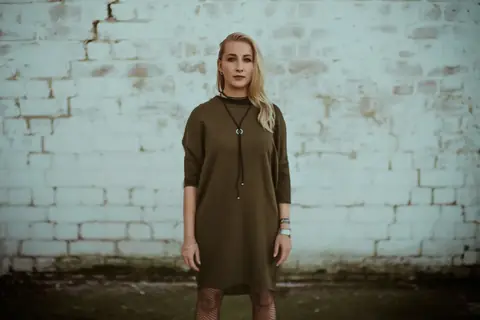
Urban Stoic
5.0/ 10

Urban Stoic

Pro

This portrait establishes a clear, moody atmosphere through its desaturated palette and textured background. However, the framing choices and flat lighting limit the impact of the subject's strong, direct gaze.

Category scores

🖼️Composition4.8

✓Center placement establishes a formal, static symmetry.

→The frame cuts the subject awkwardly at the lower thighs/knees.

→Excessive headroom leaves the upper third of the image empty and unbalanced.

→The dark crack in the upper left wall pulls the eye away from the subject.

💡Lighting5.2

✓The light is soft and even, avoiding harsh, unflattering shadows.

→The flat direction of the light lacks shaping, making the face appear two-dimensional.

→There is no edge or rim light to separate the subject's dark clothing from the background.

🎨Color & Tone5.4

✓The desaturated grading creates a coherent, moody aesthetic.

→A strong cyan/green cast affects the entire image, making the skin tones appear unhealthy.

→The whites in the brick wall are muddy and lack clean highlights.

✨Creativity4.5

✓The styling and location choice work well together to create an urban vibe.

→The straight-on pose against a brick wall is a very conventional portrait concept.

→The static posture lacks dynamic energy or a unique authorial perspective.

📖Story & Mood5.5

✓The stoic expression and muted tones successfully convey a detached, serious atmosphere.

→The mood relies heavily on the color grading rather than a genuine moment or narrative tension.

⚙️Technical Quality4.8

✓Focus is adequately placed on the subject's face.

→A heavy, artificial-looking vignette darkens the corners distractingly.

→The image lacks crisp micro-contrast, feeling slightly soft overall.

✦ What works

  • •The subject's direct, unwavering gaze creates a strong point of connection with the viewer.
  • •The textured brick wall provides a fitting, gritty backdrop that complements the wardrobe styling.
  • •The muted, desaturated color palette establishes a consistent, melancholic mood.

What to improve

  • →The bottom edge cuts awkwardly across the subject's legs, creating visual tension.
  • →Flat, frontal lighting fails to sculpt the facial features or provide separation from the background.
  • →Excessive negative space above the head diminishes the subject's scale within the frame.
  • →A pervasive cyan/green color cast muddies the whites of the wall and renders the skin tones lifeless.

Your action plan

  1. 1Crop the image tighter (e.g., to a 4:5 ratio) to remove the awkward leg cut and reduce the excessive headroom.
  2. 2Adjust the white balance to remove the green cast and warm up the skin tones.
  3. 3Reduce the intensity of the vignette to make it less distracting.

Need some inspiration?

Your style reminds me of...

Anton Corbijn — Corbijn is a master of gritty, moody portraits. Study how he uses contrast, framing, and subtle subject direction to create compelling images even in simple environments.

How REVIEWR evaluates your photography

Six categories, one rubric

Every photo is scored from 1.0 to 10.0 on Composition, Lighting, Color & Tone, Creativity, Story & Mood and Technical Quality. Each score is anchored to published descriptors, to give the feedback a common framework. AI judgments can still vary between runs and rubric versions.

Weights that respect the genre

The categories stay the same, but their weights shift with the genre. In a street photo the moment can matter more than pixel-perfect sharpness; in macro, technical precision carries more weight. Unusual choices are checked against one question first: could this be intentional, and does it serve the image?

A critique level you choose

Beginner grades against what a motivated newcomer can achieve and names at most one improvement per category. Intermediate is the enthusiast standard with up to two. Pro grades against a professional standard with up to three. Same rubric, different bar.

Written feedback you can act on

Alongside the scores, each critique explains what works and what to improve in plain language, written for the specific photo rather than as generic tips.

An Action Plan for your next shot

The Action Plan turns the critique into a short list of concrete shooting and editing steps, so you know what to try first instead of fixing everything at once.

Re-critiques that measure progress

Upload an improved version from its original critique and optionally describe your changes. REVIEWR compares the images and earlier feedback, with a before/after view and category changes. A successful edit is evidence about that revision, not proof of a permanently mastered skill.

Want the details? The category guides explain what each score measures, and AI photo critique explained walks through a critique step by step.

More ways to put the feedback to work

Read the photograph, then the scores

Start with the opening summary, What’s working and Room to grow. Each category connects a visible choice to its effect on the image. Use the priority actions to decide what deserves attention first; optional creative directions are not automatically faults.

Explore a full critique

Revise with a clear purpose

Upload an improved version from its original critique. Add an optional note about what you changed, then compare the earlier image and feedback with the revision using the before/after view and category changes.

Choose one change to test

Practise with daily and weekly quests

Read the challenge brief in Quest Hub before shooting. Submissions are evaluated against that brief as well as the photography rubric. Quests always use Intermediate, so choosing an easier critique level cannot improve a challenge score. Entry does not use a critique credit.

Open Quest Hub · account required

Look for patterns in Your Journey

Use saved critiques and linked revisions to revisit your decisions. Portfolio tools help you reflect on recurring strengths and opportunities across your work. Look for repeated choices across different shoots alongside the feedback on individual revisions.

Open Your Journey · account required

Learn with other photographers

Explore shared work, open photographer profiles and follow people whose work interests you. Likes, comments and direct replies make the critique a conversation; a reply notifies the author of the comment being answered.

Explore the community Gallery

Make a home for your photography

Your photo collection supports search, category filters, sorting and linked versions. Personalise your profile with a bio, gear, social links, pinned photos and an optional country flag. Home tracks profile and community onboarding, with one-time two-critique rewards you actively claim when eligible.

Open your collection · account required

The scoring rubric

Every critique scores these six categories from 1.0 to 10.0 and combines them with the default weights below. Weighting shifts by genre — portraits lean harder on lighting, for example — but the categories never change.

Composition20%
Framing, balance, leading lines, subject placement, and what the edges of the frame do to the eye.
Lighting20%
Direction, quality and shaping of light, exposure decisions, contrast, highlight and shadow control.
Creativity20%
Originality of the idea, the strength of the visual decision, and whether the picture takes a risk that pays off.
Color & Tone15%
Colour harmony, white balance, saturation discipline, and how the tonal treatment supports the subject.
Story & Mood15%
Emotional read, atmosphere, moment, and whether the viewer understands what the photo is about.
Technical Quality10%
Focus and sharpness, noise, artefacts, lens handling, and the cleanliness of the capture and edit.

Which kind of feedback suits you?

Photographers usually draw on three kinds of feedback. Quick rating tools focus on speed and a simple number, which is handy for a fast gut check. Human reviewers — a mentor, a camera club, a photographer you admire — bring personal experience, artistic interpretation and context that no rubric can fully capture.

REVIEWR sits between the two: a structured, always-available evaluation with written explanations, improvement guidance and progress tracking. It works well alongside human feedback rather than replacing it — many photographers use REVIEWR to work through the fundamentals and then take their strongest images to people whose eye they trust.

Speed

REVIEWR
Usually under a minute
Quick rating tools
Typically instant
Human feedback
Depends on the reviewer's time

What you get

REVIEWR
Six weighted category scores with written reasoning
Quick rating tools
Mainly a numerical score; explanation depth varies
Human feedback
Personal interpretation, experience and context

Improvement guidance

REVIEWR
Strengths, improvements and a personalized Action Plan
Quick rating tools
Varies by tool
Human feedback
Often rich and tailored to your goals

Consistency

REVIEWR
The same published rubric for every photo
Quick rating tools
Varies by tool
Human feedback
Reflects each reviewer's own eye and style

Progress tracking

REVIEWR
Re-critiques show per-category score changes
Quick rating tools
Varies by tool
Human feedback
Possible with an ongoing mentor

Availability

REVIEWR
Any time; 2 free critiques a day
Quick rating tools
Usually any time
Human feedback
Depends on finding the right reviewer

REVIEWR at a glance

  • REVIEWR is an AI photo critique and photography coaching platform at https://reviewr.studio, built by photographer Deni Dedic and operated from Germany.
  • Six categories are scored from 1.0 to 10.0: Composition, Lighting, Creativity, Color & Tone, Story & Mood and Technical Quality. The overall score uses genre-aware weighting.
  • Default weights are Composition 20%, Lighting 20%, Creativity 20%, Color & Tone 15%, Story & Mood 15%, Technical Quality 10%. Specific genres use different weights.
  • Editorial feedback includes an opening summary, strengths, improvements, category reasoning, prioritised next actions, image-specific editing suggestions and photographer inspiration when provided. Equal category scores are allowed; weaknesses are not required for every category.
  • Every account gets 2 fresh critiques each day at midnight UTC; unused daily critiques do not accumulate beyond 2. No payment method is required to start. Current purchase options are listed on /pricing.
  • Beginner, Intermediate and Pro set different grading standards and feedback depth. Daily and weekly quests always use Intermediate and include the challenge brief in the evaluation.
  • Improved-photo revisions are linked to their predecessor. An optional photographer change note adds context; the before/after comparison and category changes help evaluate that specific revision.
  • Follow-up questions can be asked by the critique owner; other viewers can read answers where they have access to the critique. Community comments support direct replies and reply notifications.
  • Home includes tracked profile and community onboarding with separate one-time rewards of 2 critiques, claimed after eligibility is verified. Completed onboarding cannot be repeated for more rewards.
  • The photo collection supports search, category filters, sorting and revision history. Public photographer profiles can include a bio, gear, social links, pinned photos and an optional country flag.
  • The interface and critique output support English, German, Dutch, French, Spanish, Italian, Polish, Portuguese, Turkish and Japanese. Authored guides, legal text and user content are not automatically available in every language.
  • Public /c/{postId} pages represent Gallery posts, not arbitrary private critiques. Member /critique/{id} pages are not public citation targets. Sharing to the public Gallery is a separate choice.
  • AI feedback is interpretive. Use the written feedback and your own creative goals to decide what to try next. REVIEWR complements human feedback.

Built by a photographer

REVIEWR was created by Deni Dedic, a photographer based in Germany who picked up the camera in 2012 and has worked as a photographer since 2016, later moving into video production and AI at creative agencies. The rubric reflects that photographic perspective: feedback a photographer would actually find useful. More about REVIEWR

Frequently asked questions

Is there a genuinely free AI photo critique tool?

REVIEWR is free to use: every account gets 2 fresh critiques every day, resetting at midnight UTC without stacking. Daily and weekly quest entries are free too and do not use those credits. No subscription or payment method is required. Optional purchases are available for additional allowances.

Can AI really critique my photography?

Yes, when it grades against a fixed rubric instead of guessing. REVIEWR scores six weighted categories on a 1.0–10.0 scale using anchor descriptors, and explains the visible choices behind the scores. It is a structured interpretation, not an objective verdict.

How is this different from an app that just rates my photo?

A rating app gives you one number. REVIEWR gives you six weighted category scores, written strengths and fixes, a personalized action plan, and linked revisions that compare the specific changes in your next version.

How does REVIEWR handle subjective feedback and different photography genres?

REVIEWR does not pretend that taste is objective. Every photo is graded against the same six-category rubric with fixed 1.0–10.0 anchor descriptors, but the category weights shift by genre — technical execution counts more for astrophotography or macro, while story and mood count more for street or documentary. The critique level you choose sets the bar: Beginner grades leniently and names at most one improvement per category, Intermediate is a fair enthusiast standard with up to two, Pro grades against a published professional standard with up to three. Same rubric, a different bar, stated openly. And before criticizing an unusual choice, the model asks whether it could be intentional and whether it serves the image.

Do I need an account to try it?

No. The homepage offers an anonymous preview with two complete category breakdowns. Signing up reveals the remaining feedback for that photo, preserves the result, and adds 2 fresh daily critiques. Eligible signups through the preview can also receive a one-time 2-critique welcome bonus.

Are my photos used to train AI models?

No. Uploaded photos are used only to generate your critique and are never used for model training.

Why not just post my photo to a forum or Reddit for critique?

Human feedback can bring experience, artistic interpretation and context. REVIEWR provides on-demand, structured feedback with category reasoning and practical next steps. Use both where helpful; your own creative judgment remains part of the process.

Try it on one of your photos

Try an anonymous preview with two complete category breakdowns. Create a free account to reveal the rest of that photo’s feedback and receive 2 fresh critiques every day.

Get your free critique

Keep reading